
Does RAM Speed Matter?
RAM speed can help your computer run faster than ever, but should you worry about it when picking out RAM?Buying Guides

The most important consideration with computer RAM is making sure you have enough. If an app or game demands 8GB all by itself, you need to make sure your RAM capacity is at least 16GB to ensure that you can run the app and still have some left over for background tasks. But RAM speed is an important factor too.
 Photo: Jacob Bobo
 RAM speed is most impacted by its generation, with newer, higher-numbered memory standards offering greater performance in general than older predecessors. DDR5 is much faster than most DDR4 kits, and DDR4 is significantly faster than DDR3, for example. That performance difference isn’t like capacity, in that one kit can run the app and the other can’t, but RAM speed can have an impact on your overall system performance. There are also certain apps and games that are more sensitive to it, making using faster RAM a worthwhile endeavour if you’re considering upgrading.
There are some potential drawbacks to using the fastest of memory beyond cost, so it’s not always worth just going for the fastest RAM your system supports. Here’s everything you need to know about RAM speed and how to make the most of it for your PC.
What is RAM Speed and How is it Measured?
Like many components, there are a range of factors which are related to how fast memory actually is when used in the real world. For RAM, the three most important factors are frequency, latency, and bandwidth. How many channels the memory supports is also important, but considering all consumer devices use dual channel memory, and only HEDT and servers use quad, or octo-channel memory for increased overall bandwidth, we won’t be discussing that in any great detail.

Frequency
The most commonly cited performance metric for RAM is frequency. Usually given in Megatransfer per second (MT/s) and colloquially translated into Megahertz (MHz), RAM frequency relates to how much data can be transmitted over the memory bus every second. Higher Megatransfers per second, or a higher frequency, means the memory can handle more information at once, making it effectively faster.
This is the number that makes the biggest leap in a new generation of memory, with the latest standards basically doubling their predecessor each time there’s a new line of RAM available. For example, DDR3 is rated between 800 MT/s and 1,600 MT/s, while DDR4 starts at 2,400, and reaches 4,400 MT/s at the top end. DDR5 gets close to 10,000 MT/s and, with overclocking, can reach over 12,000 MT/s in extreme cases.
Latency
RAM latency has a sizeable impact on performance too, and effectively measures the delay between a CPU making a request of the memory, and the RAM sending the data to the CPU for use. The most important measurement of RAM latency is its CAS speed. These timings are sometimes listed by the moniker CL, so you may have a kit that is CL40, or CL38, for example. There are many other timings that have their own impacts, too, and they need to be in sync to not create instability.
Lower numbers mean lower latency, which results in better performance; The reverse of what happens with frequency, where the higher number delivers better performance.
Bandwidth
Bandwidth takes the latency and frequency figures and gives a number for how much data the memory can transfer in a given time period. It factors in the memory frequency, timings, data rate, and bus width in creating the overall raw performance metrics.
For example, a memory kit that is rated for 8,200 MT/s could have an overall bandwidth of around 120 GB/s. Raise its frequency, tighten the timings, or change its data rate, and the bandwidth would increase in turn. If that same memory was used in a server with quad-channel support and the appropriate number of sticks, its bandwidth would be much higher again.
Does RAM Speed Affect Performance?
In short, yes. The longer answer is that it does, but not as much as other components like the CPU, GPU, or SSD, and there is definitely extra performance to be found in a wide range of tasks by simply using a faster kit of memory. There are diminishing returns though, with the very fastest memory being more useful in professional settings, or for setting overclocking records, than it is for gaming or general office use.
General System Responsiveness
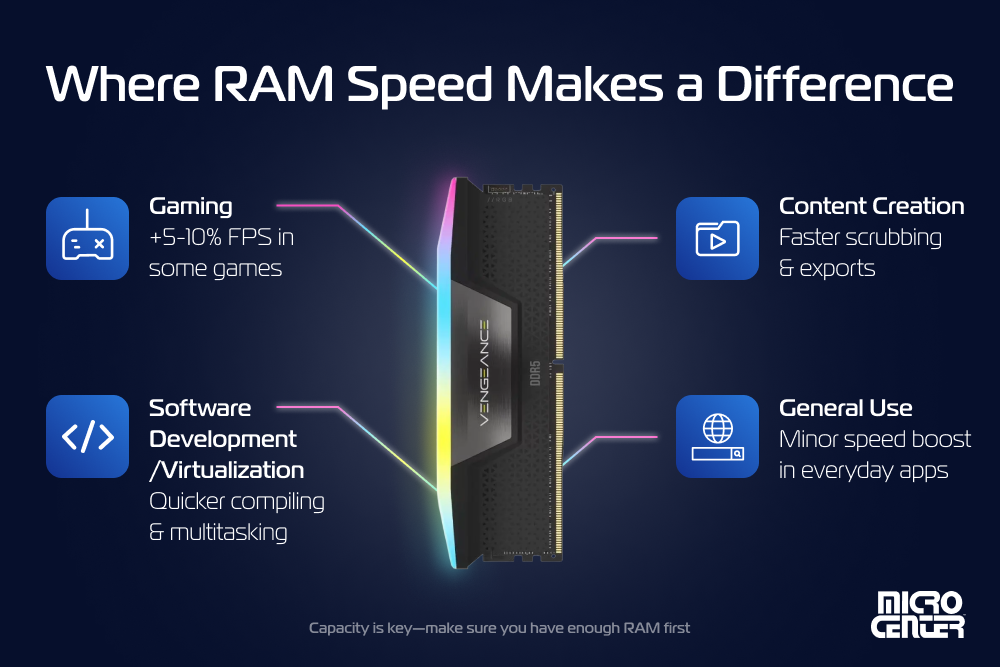
There isn’t a huge impact on general system performance when using faster memory. A few hundred megahertz extra on your RAM will make some apps load a little quicker and you might find multi-tasking between lots of browser tabs feels a little snappier, but you’re unlikely to see much in the way of real-world performance differences.
More demanding apps that use all of your memory will perform better with faster memory, but it can be very app dependent.
Gaming Performance
You still need to make sure you have enough RAM for gaming, but after that, speed can make a difference. In the right game, RAM speed can make a small, but notable improvement to performance. In low-demand esports games running at 1080p, like Counter-Strike, Fortnite, or League of Legends, faster RAM with tighter timings can unlock an additional 5-10% frames per second. That can make a real difference in how smooth the game looks and make it that bit easier to react faster, shaving milliseconds off of your response time.
The difference is less pronounced in more demanding games at higher resolutions, where the limiting factor in gaming performance is likely to be the GPU. Even with an RTX 5090, when running Cyberpunk at 4K with path tracing and all settings at Ultra, the GPU is going to be what’s limiting frame rates more than the memory. Faster RAM can still help, but only expect a percent or two of difference at the highest of settings.
It’s not always obvious what the best combination is, either, as some games respond better to tighter timings, while others benefit more from a higher frequency. But RAM speed can have an impact in most games, at least a little. It tends to be slightly more beneficial to AMD PCs, which benefit from greater overall memory bandwidth more than Intel due to the way the memory controller is designed, but this is still dependent on a number of other factors.
When it comes to CPU vs. RAM performance, a faster CPU or graphics card is almost always going to give you more of an uplift, but if you’ve already maximized your PC or budget there, upgrading the memory can be a good way to unlock a little extra.
Content Creation and Heavy Workloads
As with gaming and office applications, making sure you have a high enough capacity of memory is super important for content creation and demanding apps; You just need lots more of it. Where you might get away with 16GB for running Microsoft 365 apps, you’ll want at least 32GB for video editing. If you’re editing 4K footage, 64GB might be worth considering, too.
But memory speed makes a big impact on content creation workloads, as well. As with games, though, the exact performance gains differ between applications, and some respond more to frequency and others to timings.
Puget Systems did some in-depth testing on how different DDR5 memory speeds and timings can effect performance in different content creation apps. In Photoshop, for example, it showed faster memory could improve performance by up to 10 percent, though the choice of CPU was more important. The same was true in Adobe Premiere and After Effects, though tighter timings showed promise as being more impactful than frequency in some cases.
In real-world use, content creators who are working with ultra-high definition video, like 4K, 8K, or RAW footage, may find that faster memory makes timeline scrubbing and export speeds improve, as well as making live streaming smoother when multi-tasking, such as gaming and streaming at the same time.
Software Development and Virtualization
Like demanding content creation applications, game development and running virtualized environments can also benefit from faster memory, though it’s not linear and very app dependent. Higher memory bandwidth can improve the responsiveness of virtual systems, and faster memory can also speed up code compiling. As with gaming and general system use, too, faster memory improves multitasking performance, making it easier to jump from one app to another – very useful if vibe coding or using additional assistive tools at the same time as developing.
Puget Systems also tested how DDR5 speed and timings affects various development applications and found some interesting results. In Unreal Engine 5, for example, it found that both AMD and Intel systems benefited from faster memory, with the top performing system using both higher frequency and tighter timings ultimately enjoyed a near-20% improvement in compiling shader scoring.
However, in a clear example of how some apps respond better than others, it found that there was almost no difference in performance when running Blender or V-Ray in CPU mode. There, the fastest frequencies and tightest timings were barely three percent faster than the slowest, making the investment much harder to justify.
RAM Speed vs. RAM Capacity
The most important factor with RAM will always be capacity. You can have the fastest RAM in the world, but if you don’t have enough of it, the app or game will run terribly, or not even start at all. Making sure you have enough of whatever generation of RAM you’re using is of paramount importance.
After that, though, RAM speed can have a real impact on what you’re doing. It ensures you can make the most out of your CPU and graphics card and can unlock extra performance in various games and apps. It’s not always easy to quantify, as sometimes certain tasks will just complete a little faster, but in games you can get anywhere up to an extra 10% frames per second, though that is very dependent on the app or game in question, as well as your chosen settings and other components.
Note that in most benchmark results, the testers are using high-end components to eliminate other bottlenecks so that the difference in memory performance is clear. If you don’t have the fastest CPU or GPU for your particular game or tasks, upgrading them instead might yield better results.
Conclusion
Faster memory undoubtedly improves system performance, but it can be very dependent on a number of other factors. If you’ve already got a super-fast CPU with plenty of cores and high frequencies and your graphics card is powerful enough for the task at hand, having faster memory can make a real difference and ensures your other components can work as fast as they’re supposed to.
Just make sure you have enough RAM first, though. Capacity is the most important factor, but after that, RAM speed should definitely be on your radar for you next upgrade.
Frequently Asked Questions About RAM Speed
Does faster RAM improve FPS in games?
Absolutely it does, though not as much as a faster CPU or graphics card. Make sure you’ve enabled XMP or EXPO profiles in your BIOS to max out your memory’s built-in performance. Consider overclocking too, if you want to find a few extra FPS.
What is the relationship between RAM speed and CPU performance?
Faster RAM will help a CPU perform better, to a point. Once the RAM is fast enough to keep up with the processor, making the memory even quicker won’t do much for your CPU’s performance. AMD CPUs tend to enjoy faster RAM more, though they are more frequency limited since it’s tied to the infinity fabric clock.
The latest Intel systems support new CUDIMM modules designs, too, which can reach over 9,000 MHz out of the box.
How to check RAM speed?
The easiest way to check RAM speed is to use Task Manager. Just open it up, select the Performance tab, and then select Memory. The “Speed” at the bottom of the window will give you your RAM frequency in Megatransfers per second.
If you want more detailed memory speed information, download and run CPUZ. It will give you a detailed breakdown of your CPU and memory, including frequencies, timings, and channel, along with other information.
Can overclocking RAM significantly improve overall system speed?
It depends how much you’re overclocking it and how powerful your other components are. If you compare your PC’s performance at stock with non-EXPO memory and then overclock it beyond those ratings, you could see a sizeable improvement in general system speed. However, if you’re talking about adding a couple of hundred Megahertz to your RAM’s frequency, it’s only going to give you an extra few frames per second or shave a few seconds off a render time.
Memory speed matters, but it’s not the night and day change that a much faster CPU or graphics card can have on a system.
More from MC News
- Run AI Locally: The Best LLMs for 8GB, 16GB, 32GB Memory and Beyond
- Quantization Explained: Why the Same LLM Gives Better Results on High-End Hardware
- Why VRAM and Memory Bandwidth are Key for Powering Local AI
- Hands-on with NVIDIA DGX Spark: Everything You Need to Know
- How to Build a PC with a Hardline Water-Cooling Loop
- 3D Print a Mac Mini Monitor Mount
- The End Has Come for Windows 10: Four Tips to Make the Most of Windows 11
- Everything You Need to Know About WiFi 7
- Keyboard 101: Intro to Computer Keyboards
- Fix It Yourself: Talking to iFixit on Why Repairable Tech Matters
Jon Martindale is a freelance technology journalist and writer from Gloucestershire, UK. He's written for a range of publications over a 20-year career, including DigitalTrends, USNews, Forbes, and Lifewire, among many others. Over that time he's written countless how-to guides, best-of lists, hands-on reviews, and in-depth op/ed features.
He has been building and working with computers since his teens, and loves nothing more than trying out the latest components and gadgets to see what they can do. When he isn't staring at a monitor, he can be found chasing after with his two young children, playing board and roleplaying games, or walking his French bulldog cross.