Resin Printing Safety 101


Photo: Steven Asarch
Having a resin printer at home is truly amazing. You can find the most detailed miniature on the internet and have it in your hands in just a couple of hours. But even for the most advanced hobbyist, resin printing can be daunting since there are so many little things that can go wrong. From the temperature of your printing space creating a brittle product to the fumes, there's a lot you need to handle before you ever get to hold a miniature in your hands.
Here are some important tips you need to follow in order to print safely and efficiently.
What do you need to get started printing?
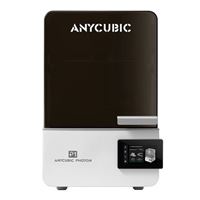
Obviously, the first thing you need to get started with resin printing is a printer. I have been loving my AnyCubic Photon printer, which has an LCD screen to track prints, a uniform UV light for equal curing, and a laser-engraved build plate that keeps models from falling off.
Not all resin printers are made the same. For example, if you are looking to do a large array of models at once, you'll need a larger print bed, like the AnyCubic Photon P1.
On top of a printer, you will also need a washing and curing station. Most resins need to be cleaned with isopropyl alcohol before curing (though there are some resins that can be washed with just water). I actually find it better to have a two-dunk system to clean prints—I have one container filled to the brim with isopropyl alcohol that I dunk the models in while they are still on the plate, and then another washing station I put them in my AnyCubic Wash & Cure 3 Plus to give them one more rinse. After that, I give them a UV ray shower, and they are good to go.
Is resin safe to touch?
Unlike PLA, which you can basically grab straight off the build plate, resin can be volatile on our human bodies. Touching uncured resin can lead to skin irritation, blemishes, or even chemical burns. It's important not to handle resin with your bare hands and use Nitrile gloves; medical-quality gloves are what I use.

Photo: Steven Asarch
Limiting the time you touch resin is important and can help limit the amount of waste you have. The system I've been using limits the amount of physical interaction I have with uncured resin. I dunk the models in ISP while they are still on the build plate, pop them off with a metal spatula into the wash and cure station, and I don't cut the sprues until the resin is entirely cured. Normally, those sprues would be too hard, but I find a dunk in boiling water softens them up just enough to come apart with clippers.
Is resin safe to breathe?
When resin starts to cure, it releases Volatile Organic Compounds (VOCs), which is a carbon based vapor that's a byproduct of the chemical reaction. Just breathing it in the short term can lead to nose, eyes, and throat irritation. But long-term, it can have lifelong effects like chronic respiratory issues or skin allergies.
When you are printing with resin, you should take all the necessary precautions to keep you safe. I like to use a carbon activated charcoal mask, as that neutralizes and captures the VOCs. Keep in mind that those N95 masks that you have lying around do not work against VOCs.
The most important piece of your set-up, other than the printer and the curing station, is a filtration system. Sure, you can just keep the printer in a rarely used part of your house, but you'll still be exposed to the harmful contaminants whenever you check on it. Also, if you live in an apartment or a smaller space, there's nowhere they can go.
I recently started keeping my resin printers inside of a tent that has a fan and a tube that directly connects to the outside. That way, all the fumes go directly out of my place. You should look for a tent that fits both the printer and the curing station, with a fan strong enough to push the fumes out of the tube.
What's the ideal printing environment?
Figuring out how to get a perfect print, the optimal exposure time, and the right settings can only happen through trial and error. As easy as it would be for me to just give you the print settings that I use on my printer, that really wouldn't work. Each printer is affected by its environment, resin, and, of course, model. You'll have to tinker with your printer to get each setting exactly where you want it. I've found it incredibly useful to search for your model on Reddit to see what other people are using.

Photo: Steven Asarch
But your physical environment also plays a big role in your printer. You want between 30 and 50 percent humidity when it comes to printing. Too much humidity can make it hard for the layers to interface, and too low can cause it to cure too quickly.
The temperature of your printing station is even more important, as if it's too hot or cold, your prints could get brittle or not adhere well enough to the print plate. The ideal temperature for a resin print is between 68 and 77 degrees Fahrenheit. Some tents, like the one I just purchased, have gauges that tell you humidity and temperature, which I highly recommend.
How do I dispose of resin?
Like batteries and old electronics, uncured resin can't go in the trash. If someone just picks it up without knowledge, it could cause them harm, and it can even cause issues with the environment. Uncured resin is a hazardous material, as is everything that comes into contact with it. That means the gloves, paper towels, and even the ISP you use need to be disposed of properly. You should look online for how your local municipality wants you to dispose of hazardous waste.
More from MC News
-
Run AI Locally: The Best LLMs for 8GB, 16GB, 32GB Memory and Beyond
-
How to Use Local AI With Your Own Files: A Beginner's Guide to RAG
-
Reading vs. Answering: The Two Hardware Bottlenecks Behind Local AI Performance
-
Quantization Explained: Why the Same LLM Gives Better Results on High-End Hardware
-
Why Context Length, Not AI Model Size, Is Your Biggest VRAM Problem
-
Fix It Yourself: Talking to iFixit on Why Repairable Tech Matters
Steven Asarch has written for Business Insider, Rolling Stone, MSNBC, Complex, Kotaku, Tom's Guide, and many more. In 2021, he executive-produced Onision: In Real Life as a docuseries for Discovery+.